Happy New Year, "Teach with Tech" listeners!
Soon the new semester will be upon us, here at Indiana University. As I have since 1998, I'll be teaching my online course, Education W505: Using the Internet in the K-12 Classroom. I'm looking forward to the new semester, and meeting the new students. Of course, the class has changed over the years I've taught it, just as the Internet has grown and developed. The basic idea of the course is that I lead students through the basic tools of the Internet (email, the Web, chat/instant messaging, learning management systems, etc.) and we discuss how they can be integrated into the student's current or future teaching. Recently, I've added podcasts, blogs and wikis into the class. The activities and projects all revolve around creating things that can actually be used by the students in their teaching. I've been really pleased and impressed with the work that my students have done in this course, creating webpages, webquests, etc. The capstone activity involves creating an instructional unit that integrates the Internet. One of my favorite aspects of teaching this course is that the students are so diverse--while I welcome students from Indiana, it is always nice to have students from out of state or out of the country. This past semester I had a student in Taiwan, and I've had them from Dubai, Japan, England, Pakistan, etc. over the years. I'm still looking for a few more students for this semester (which starts January 9th). Interested? Check it out at: http://www.indiana.edu/~w505a/
Only a week or so before I leave for the MacWorldExpo convention! Can't wait! I'm sure I'll have lots to share in the podcast when I get back.
The International Student Media Festival will start accepting K-12 media project entries on February 1st! Time to start thinking about your class's entry, if you haven't already.
Cheers,
Chris
Showing posts with label K-12. Show all posts
Showing posts with label K-12. Show all posts
Sunday, December 31, 2006


Tuesday, November 28, 2006
Teachers' TV!
This posting is a continuation of the previous one about using online video...
teacher's tv
http://www.teachers.tv/
This is quite an exciting find! Teachers' TV has over a thousand online video programs (or programmes as these Brits would have it) on K-12 teacher professional development topics.
The first one I watched was:
Internet Research and Podcasting
http://www.teachers.tv/video/3207
This episode covers webquests and podcasting as used in secondary classrooms. Plus a number of excellent tech tips--for example, an elementary teacher says she has her students turn off their monitors when they are supposed to be paying attention to her in the computer lab.
The streaming was pretty darn slow, even with my broadband connection from the university, so I'd suggest downloading these very professionally produced Windows Media and Qucktime files (it seems you have to register to download the files, though you can view them without registering; registration is free). They also sell DVDs of some shows.
This episode was, of course, about teaching with technology. However, the majority of these videos are not about teaching with technology, but instead range all over the K-12 age range and content areas.
Other examples:
Body Image for Beginners
http://www.teachers.tv/video/4888
Much of this one is teachers talking about the subject, but it also features fascinating but kinda saddening clips from interviews from fifth-grade students who are already quite aware that they are "too fat" or "too freckled."
KS1 Literacy: Laying the Foundations 2
http://www.teachers.tv/video/220
in this video, an experienced teacher describes and shows a Vygotsky-based approach to early language and literacy learning. The fact that you can actually see what she is talking about in action in the classroom really makes this video useful.
The site is well-constructed. You can bookmark the various videos you are interested in (important when there are so many), and it keeps track of recently viewed videos so you can easily find them.
But that's not all.... (Like they say in the late-night infomercials.) When you visit this site, you also get
InClass tv
http://www.teachers.tv/inclasstv
This, a subsite of teachers.tv, hosts a collection of videos for showing to students, again ranging all over the K-12 curriculum. Of course, some kids may have problems at time understanding the English accents.
The home page highlights videos on math (or maths), PE and social studies.
All in all, a tremendous source of videos for K-12 teachers!
Chris
teacher's tv
http://www.teachers.tv/
This is quite an exciting find! Teachers' TV has over a thousand online video programs (or programmes as these Brits would have it) on K-12 teacher professional development topics.
The first one I watched was:
Internet Research and Podcasting
http://www.teachers.tv/video/3207
This episode covers webquests and podcasting as used in secondary classrooms. Plus a number of excellent tech tips--for example, an elementary teacher says she has her students turn off their monitors when they are supposed to be paying attention to her in the computer lab.
The streaming was pretty darn slow, even with my broadband connection from the university, so I'd suggest downloading these very professionally produced Windows Media and Qucktime files (it seems you have to register to download the files, though you can view them without registering; registration is free). They also sell DVDs of some shows.
This episode was, of course, about teaching with technology. However, the majority of these videos are not about teaching with technology, but instead range all over the K-12 age range and content areas.
Other examples:
Body Image for Beginners
http://www.teachers.tv/video/4888
Much of this one is teachers talking about the subject, but it also features fascinating but kinda saddening clips from interviews from fifth-grade students who are already quite aware that they are "too fat" or "too freckled."
KS1 Literacy: Laying the Foundations 2
http://www.teachers.tv/video/220
in this video, an experienced teacher describes and shows a Vygotsky-based approach to early language and literacy learning. The fact that you can actually see what she is talking about in action in the classroom really makes this video useful.
The site is well-constructed. You can bookmark the various videos you are interested in (important when there are so many), and it keeps track of recently viewed videos so you can easily find them.
But that's not all.... (Like they say in the late-night infomercials.) When you visit this site, you also get
InClass tv
http://www.teachers.tv/inclasstv
This, a subsite of teachers.tv, hosts a collection of videos for showing to students, again ranging all over the K-12 curriculum. Of course, some kids may have problems at time understanding the English accents.
The home page highlights videos on math (or maths), PE and social studies.
All in all, a tremendous source of videos for K-12 teachers!
Chris
Thursday, November 16, 2006
Integrating Online Video Into Your Teaching
Incorporating Online Video Into Your Teaching
If a picture is worth a thousand words, how many words is a video clip worth? Already, if you're like most teachers, you have a few selected VHS or DVDs that you cue up to illustrate various points or concepts, incite student interest, start conversations, etc. Of course, you don't watch the whole 90 minute movie, you just show just that choice section. Many teachers are starting to create their own DVDs with just the video segments that they want to use in class, to avoid fumbling with a remote control in front of the students. But often, it is hard to find just the right clip from your personal video library or the school media center...and buying new tapes and DVDs...who has the budget for that?
Well, there is another option now, online streaming video clips. You have probably heard of YouTube, for example. A great source of videos of Chinese kids singing along to Backstreet Bouys songs and America's Worst Home Videos. But there is some educational content there if you search hard enough. And Ive found some sites below that provide educational clips, free of charge, over the Internet. If your classroom has a good broadband connection, you might well want to consider using clips from some of these sources in your teaching.
Video Sources
Google Video
http://video.google.com/videosearch?q=genre:educational&so=1
YouTube
http://www.youtube.com/categories
These are the famous, hugely popular sites for finding online video clips. The vast majority, of course, of these clips aren't educational in nature. (Though Google at least has an Education category.) But, depending on u your subject, it's worth a look. One nice thing about Google Video is that you can download most clips instead of having to rely on a live internet connection--which is great for teachers. You'll know the clip is safely on your hard drive when you're presenting it to a classroom of kids. Of course, when searching these sites, be aware that there is a lot of "inappropriate" content. And your school may block the site as well, because of that and/or bandwidth issues.
AOL Video: Learning and Adventure
http://video.aol.com/video-category/learning-and-adventure/255?sem=1&ncid=AOLVID00170000000005
Quite a few videos here for use with K-12 students.
UnitedStreaming Video
http://www.unitedstreaming.com/
Claims to be "in more than half of US Schools". Could this be true? 40,000 video clips correlated to state standards. Try it free for 30 days.
ide@s
http://virage-prod.uwex.edu/vss-bin/vss_SR.exe/ideas/ideas_search
This site, from Wisconsin, has a database of 297 videoclips, each linked to state K-12 standards. Even if you're not from Wisconsin, you may find something useful here. I had some difficulty on my Mac, though, getting them to play.
Multimedia Seeds: Video Clips
http://eduscapes.com/seeds/clips.html
This page has a good list of sites that offer video clips in a range of content areas
Annenberg Media
http://www.learner.org/resources/browse.html
A wide variety of streaming videos for both K-12 and college instructors who are seeking to enhance their professional development. Many are targeted at K-12 teacher professional development such as "Essential Science for Teachers: Physical Sciences", "inside Writing Communities: Grades 3-5" and "In Search of the Novel." The latter covers how to teach 10 novels to high school students. Well worth checking out!
Resourses about Using Video in Your Teaching
(I wish I could find more of these...any suggestions?)
Seeing is Believing: Harnessing Online Video Clips to Enhance Learning
http://www.education-world.com/a_curr/profdev040.shtml
" Most teachers have come to understand that Net-Geners relate best to curriculum when teachers incorporate the medium that captivates them the most -- video -- to help translate abstract concepts or events into their reality."
Video Clips / Vodcasts for Online Literature Courses: The Allure of the Moving Image
http://elearnqueen.blogspot.com/2006/10/video-clips-vodcasts-for-online.html
For those of you considering creating your own video clips, whether for an online course or face-to-face, here are some good guidelines to follow. The "E-Learning Queen" focuses on content here, not technical issues, which makes this particularly useful, I think. Has examples of clips.
Would love to add on to these lists. Feel free to share suggestions via comments.
Chris
If a picture is worth a thousand words, how many words is a video clip worth? Already, if you're like most teachers, you have a few selected VHS or DVDs that you cue up to illustrate various points or concepts, incite student interest, start conversations, etc. Of course, you don't watch the whole 90 minute movie, you just show just that choice section. Many teachers are starting to create their own DVDs with just the video segments that they want to use in class, to avoid fumbling with a remote control in front of the students. But often, it is hard to find just the right clip from your personal video library or the school media center...and buying new tapes and DVDs...who has the budget for that?
Well, there is another option now, online streaming video clips. You have probably heard of YouTube, for example. A great source of videos of Chinese kids singing along to Backstreet Bouys songs and America's Worst Home Videos. But there is some educational content there if you search hard enough. And Ive found some sites below that provide educational clips, free of charge, over the Internet. If your classroom has a good broadband connection, you might well want to consider using clips from some of these sources in your teaching.
Video Sources
Google Video
http://video.google.com/videosearch?q=genre:educational&so=1
YouTube
http://www.youtube.com/categories
These are the famous, hugely popular sites for finding online video clips. The vast majority, of course, of these clips aren't educational in nature. (Though Google at least has an Education category.) But, depending on u your subject, it's worth a look. One nice thing about Google Video is that you can download most clips instead of having to rely on a live internet connection--which is great for teachers. You'll know the clip is safely on your hard drive when you're presenting it to a classroom of kids. Of course, when searching these sites, be aware that there is a lot of "inappropriate" content. And your school may block the site as well, because of that and/or bandwidth issues.
AOL Video: Learning and Adventure
http://video.aol.com/video-category/learning-and-adventure/255?sem=1&ncid=AOLVID00170000000005
Quite a few videos here for use with K-12 students.
UnitedStreaming Video
http://www.unitedstreaming.com/
Claims to be "in more than half of US Schools". Could this be true? 40,000 video clips correlated to state standards. Try it free for 30 days.
ide@s
http://virage-prod.uwex.edu/vss-bin/vss_SR.exe/ideas/ideas_search
This site, from Wisconsin, has a database of 297 videoclips, each linked to state K-12 standards. Even if you're not from Wisconsin, you may find something useful here. I had some difficulty on my Mac, though, getting them to play.
Multimedia Seeds: Video Clips
http://eduscapes.com/seeds/clips.html
This page has a good list of sites that offer video clips in a range of content areas
Annenberg Media
http://www.learner.org/resources/browse.html
A wide variety of streaming videos for both K-12 and college instructors who are seeking to enhance their professional development. Many are targeted at K-12 teacher professional development such as "Essential Science for Teachers: Physical Sciences", "inside Writing Communities: Grades 3-5" and "In Search of the Novel." The latter covers how to teach 10 novels to high school students. Well worth checking out!
Resourses about Using Video in Your Teaching
(I wish I could find more of these...any suggestions?)
Seeing is Believing: Harnessing Online Video Clips to Enhance Learning
http://www.education-world.com/a_curr/profdev040.shtml
" Most teachers have come to understand that Net-Geners relate best to curriculum when teachers incorporate the medium that captivates them the most -- video -- to help translate abstract concepts or events into their reality."
Video Clips / Vodcasts for Online Literature Courses: The Allure of the Moving Image
http://elearnqueen.blogspot.com/2006/10/video-clips-vodcasts-for-online.html
For those of you considering creating your own video clips, whether for an online course or face-to-face, here are some good guidelines to follow. The "E-Learning Queen" focuses on content here, not technical issues, which makes this particularly useful, I think. Has examples of clips.
Would love to add on to these lists. Feel free to share suggestions via comments.
Chris
Monday, November 06, 2006
Episode 15: (Digital Video Analysis) is Online!
Episode 15 Now Available!
Hello again!
The Instructional Consulting Office is pleased to announce that "Teach with Tech" Episode 15 is now available for your listening pleasure. This podcast episode is entitled "Digital Video Analysis." This episode features an interview with Jon Tapp, the Director of Computer Services at the Vanderbilt University Kennedy Center for Research on Human Development. Jon is the developer of a program called ProcoderDV. ProcoderDV is designed for those doing reasearch requiring the analysis of digital video files, such as classroom interactions, counseling sessions, etc.
What is a podcast? A podcast is like a short radio show in digital format. You can download the mp3 audio file and play it on your computer, or put it on your iPod or similar digital audio player.
Episode 15 is available, as are all the previous episodes of "Teach with Tech", at http://www.indiana.edu/~icy/podcast/
You can subscribe to the series via iTunes by using this URL:
http://phobos.apple.com/WebObjects/MZStore.woa/wa/viewPodcast?id=87095475
Comments and questions welcomed!
Hello again!
The Instructional Consulting Office is pleased to announce that "Teach with Tech" Episode 15 is now available for your listening pleasure. This podcast episode is entitled "Digital Video Analysis." This episode features an interview with Jon Tapp, the Director of Computer Services at the Vanderbilt University Kennedy Center for Research on Human Development. Jon is the developer of a program called ProcoderDV. ProcoderDV is designed for those doing reasearch requiring the analysis of digital video files, such as classroom interactions, counseling sessions, etc.
What is a podcast? A podcast is like a short radio show in digital format. You can download the mp3 audio file and play it on your computer, or put it on your iPod or similar digital audio player.
Episode 15 is available, as are all the previous episodes of "Teach with Tech", at http://www.indiana.edu/~icy/podcast/
You can subscribe to the series via iTunes by using this URL:
http://phobos.apple.com/WebObjects/MZStore.woa/wa/viewPodcast?id=87095475
Comments and questions welcomed!
Wednesday, October 18, 2006
Episode 14 (International Student Media Festival) is Available!
Episode 14 is now available! Some of you may be listening to it right now. This episode features a few short, entertaining and informative interviews with teacher, parent and student participants of the International Student Media Festival (http://www.ismf.net), recently held in Dallas, Texas. This festival highlights the creative work of K-12 students in a number of formats, such as still photgraphy, web design, and digital video. The episode is the shortest "Teach with Tech" so far, at under fifteen minutes, so it's a quick, fun listen. Hopefully, it will inspire some of you K-12 teachers to start projects with your students for next year's ISMF.
The blog has undergone a slight facelift, with the new Blogger dashboard. Hopefully, it is more readable now. I'm thinking a specific "Teach with Tech" logo would be nice to have sometime...
I've got a couple of interviews coming up, as well as some more material that might make it into a podcast, so stay tuned....
Chris
The blog has undergone a slight facelift, with the new Blogger dashboard. Hopefully, it is more readable now. I'm thinking a specific "Teach with Tech" logo would be nice to have sometime...
I've got a couple of interviews coming up, as well as some more material that might make it into a podcast, so stay tuned....
Chris
Monday, October 16, 2006
Back from AECT! & Podcasting Screencast
Had a great time at the Association for Educational Communication conference in Dallas, Texas. Met a lot of charming, inteliigent people and saw some old friends. As I suspected, I barely got out of the conference hotel, so I don't have a great sense of what Dallas has to offer, though I did enjoy the Mexican food at RJs on the West End.
At AECT, I presented on the topic of "Podcasting: A New Medium for Distance Learning." It was a packed room and numerous people asked me for a copy of my slides. Better than that, I've created an enhanced podcast or screencast for you, for free download. Just click on the title above. You will probably find that it opens in iTunes, but Quicktime Player should work fine, too. (Actually, I just tried this out, on Windows---for some reason, the slides are almost unreadable in Quicktime, so you will want to use iTunes after all.) I may make this a part of a "Teach with Tech" (Enhanced Podcast) series, along with my HTML tutorial, and make it subscribable. But I don't want to confuse things and upload it along with the regular "Teach with Tech." By the way, I used Profcast to make the screencast and it couldn't have been easier.
Also, while at AECT, I participated in a Skypecast, which is a live broadcast over Skype, in a show called "EdTechTalk Brainstorm." It was a lot of fun, partly because of my co-guest (is that a word?) Jennifer Maddrell, who is an IU grad student in Instructional Systems Technology. We will both be appearing on EdTech Weekly this coming Sunday at 7pm Bloomington time. They should also have an mp3 archive of this past Sunday's session up soon, so check it out. Not that my contributions were all that meaningful, but....
Do you know about the International Student Media Festival? Sponsored by AECT, it is a wonderful opportunity for K-12 students to show off their work, in areas such as still photography, stills with audio, websites, and digital video productions. I assisted as one of the judges this year, and also attended some of the events, such as Marco Torres' inspiring keynote, and the viewing of K-6 projects. I also interviewed some parents and kids, who were very excited about the ISMF. More about this in a future podcast.
More to come....
Chris
At AECT, I presented on the topic of "Podcasting: A New Medium for Distance Learning." It was a packed room and numerous people asked me for a copy of my slides. Better than that, I've created an enhanced podcast or screencast for you, for free download. Just click on the title above. You will probably find that it opens in iTunes, but Quicktime Player should work fine, too. (Actually, I just tried this out, on Windows---for some reason, the slides are almost unreadable in Quicktime, so you will want to use iTunes after all.) I may make this a part of a "Teach with Tech" (Enhanced Podcast) series, along with my HTML tutorial, and make it subscribable. But I don't want to confuse things and upload it along with the regular "Teach with Tech." By the way, I used Profcast to make the screencast and it couldn't have been easier.
Also, while at AECT, I participated in a Skypecast, which is a live broadcast over Skype, in a show called "EdTechTalk Brainstorm." It was a lot of fun, partly because of my co-guest (is that a word?) Jennifer Maddrell, who is an IU grad student in Instructional Systems Technology. We will both be appearing on EdTech Weekly this coming Sunday at 7pm Bloomington time. They should also have an mp3 archive of this past Sunday's session up soon, so check it out. Not that my contributions were all that meaningful, but....
Do you know about the International Student Media Festival? Sponsored by AECT, it is a wonderful opportunity for K-12 students to show off their work, in areas such as still photography, stills with audio, websites, and digital video productions. I assisted as one of the judges this year, and also attended some of the events, such as Marco Torres' inspiring keynote, and the viewing of K-6 projects. I also interviewed some parents and kids, who were very excited about the ISMF. More about this in a future podcast.
More to come....
Chris
Wednesday, March 01, 2006
K-12 Wiki Resources (Updated!)
 K-12 Wiki Resources
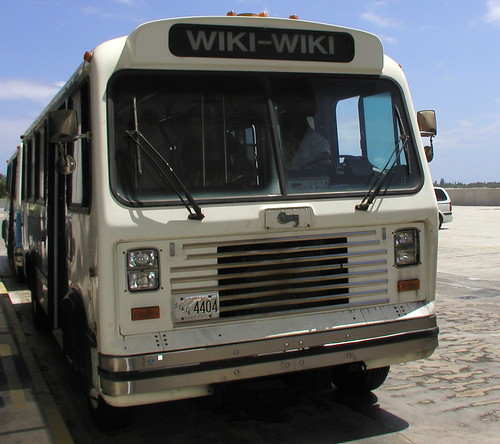
In this posting, I'm going to provide a bunch of resources for using Wikis in education, K-12 primarily. (Thanks to Christopher Sessums for the photo of the original Wiki Wiki--a Hawaiian bus.)
First, if you haven't yet, go take a look at Wikipedia: http://www.wikipedia.org
And then, the more recent Wikia--a collection of wiki-based communities. Have an interest like Star Wars or the Civil War? Start up a wiki on the topic and work together with the world to provide a collaborative resource on the material. Not a lot of K-12 oriented stuff there yet, but you could start up one there.
Then:
Make Way for Wikis
http://www.schoollibraryjournal.com/article/CA6277799.html
Excellent overview of wikis in a K-12 environment. "Teachers and librarians nationwide have begun to explore the role of wikis (pronounced wee-kees or wih-kees) in classroom settings—and the possibilities do appear endless. At Olde Columbine High School in Longmont, CO, Bud Hunt began an experiment last spring using a wiki to teach writing. “The quality of writing across the board was better than any of the work they had done previously,” he says. “I think it was because the students had an authentic audience. They knew others were looking.”
Wiki in a K-12 classroom
http://wik.ed.uiuc.edu/index.php/Wiki_in_a_K-12_classroom
Some specific examples of how you might use Wikis in your teaching.
It's on a wiki itself, so feel free to add some more!
Turning Wikipedia into an Asset for Schools
http://www.andycarvin.com/archives/2005/07/
turning_wikiped.html
Proposes an activity to check the accuracy of Wikipedia.
High School Students (and Teachers) Write Collaboratively on a Wiki
http://www.nycwp.org/paulallison/2005/12/04
A teacher provides a screencast to demonstrate "both how simple it is to begin composing together with students, and how profoundly paradigm-shifting a wiki can be in the writing classroom."
Weblogs & Wikis and Feeds, Oh My!
http://www.nycwp.org/paulallison/
Regular postings on wikis here.
Examples of Educational Wikis
http://educationalwikis.wikispaces.com/Examples+of+educational+wikis
Many, many K-12 wikis linked here, from all around the world!
Holocaust Wiki Project
http://www.ahistoryteacher.com/holocaust/tiki-index.php
This teacher is using a wiki to have his students collaboratively write about the horrific events of the holocaust.
Entire textbooks are being written via Wikis at Wikibooks.
http://en.wikibooks.org/wiki/Main_Page
- Here's an example of a book for K-12 students that is being written collaboratively using a wiki: http://en.wikibooks.org/wiki/Wikijunior_Big_Cats
- Here's an example of a book for K-12 teachers: ttp://en.wikibooks.org/wiki/Blended_Learning_in_K-12
http://www.educause.edu/pub/er/erm04/erm0452.asp
This article focuses on higher ed uses of wikis
Using Wiki in Education
http://scienceofspectroscopy.info/edit/index.php?
title=Using_wiki_in_education
This one also focuses on higher ed, but a lot is applicable to K-12 too.
k12wiki
http://k12wiki.wikispaces.com/
An interesting online conference in which K-12 teachers worked together to create wiki entries on a number of educational topics
Wiki Grading Rubric
http://k12online.wm.edu/WikiGradingRubric.pdf
Very useful!
Even humble Bloomington has its own wiki:
http://www.bloomingpedia.org/wiki/Bloomingpedia
Does your own community? A great idea for a class project!
How to get started? Find a free wiki site. Here's one:
http://pbwiki.com/
If you're an IU student, like those in my Education W505: Using the Internet in the K-12 Classroom course (totally online, open to anyone in the world who is a graduate-level K-12 teacher, librarian, counselor, administrator, homeschooler!), you can use the wiki tool in Oncourse CL.
http://kb.iu.edu/data/atkg.html
Feel free to submit further wiki resources. Especially if you're a K-12 teacher using a wiki in your teaching!
Chris
Subscribe to:
Posts (Atom)