Tuesday, May 16, 2006
Episode 9 is Available!


Episode 9 is on its way!
"These include:
* The ability to synthesize ideas and communicate to an audience
* Family bonding
* Interaction (through me) with an international audience
* Timing and presentation, and
* Role playing & humor (Simon surprised me in show #44 when describing how it works for his brother to play the serious role against his obnoxious role)"
As I said in a previous post, why not consider doing something like this with your kids?
5/17 ADDITION: I should also say that listening to this show may have some benefits to parents. Gareth does a wonderful job of managing these two rambunctious boys. Listen to the calm, affectionate way he keeps them on track throughout the episodes. When one of them begins to get too wild, he distracts them instead of getting angry or punitive. Anyway, I was impressed, and I think some parents out there could improve their relationships with their kids by using his interactions with the boys as a model. END OF ADDITION
I'm finishing up the editing right now. Unfortunately, due to time constraints, I had to edit out most of the questions that the boys fired at me (my answers weren't all that interesting anyway, though if someone really wants to know my favorite beer and baseball team, just email me). Due to Audio Hijack's only recording their side of the conversation, I also have had to rerecord all my questions. Hopefully, that won't be too obvious in the end product. The combination of iChat and Garageband really makes these online interviews easy, but I have yet to have an interviewee that is on a Mac and therefore has iChat, and I've had intermittent problems with using AOL Instant Messenger, which is compatible with iChat but for some reason some Windows people have problems with the invitations to chat--they can't find them or don't get them or something. I think the audio with Skype is better than with iChat, but this having it only get half of the conversation is annoying and makes more work for me. :(
Episode 9 may be online as soon as later today... Watch this space....
Chris
Thursday, May 04, 2006
Episode 9: A Barrelfull of Smelly Monkeys!
Tuesday, April 25, 2006
Episode 9 Notes
Here, in advance of the new podcast episode, are some notes about what I plan to cover, more or less, and relevant links. Comments, suggestions and additions welcomed!
Bootcamp, Smelly Monkeys, and More!
Bootcamp
Macs have been able to run Microsoft operating systems for a long, long time now, with programs like Virtual PC. But never before has the experience been exactly like running Windows on an Intel machine. Now, with the new Intel-based Macs, you can boot up in Windows and have the full, normal experience of running it on a Dell or Gateway. For Mac-using educators, that means you can run those programs that are still Windows-only, such as Atlas.ti, Access, Publisher and others.
http://www.apple.com/macosx/bootcamp/
Google Earth
Wow! Now you can view the earth the way the CIA does, from space down to street level, in high photo resolution. The Grand Canyon is even in a kind of 3D. Imagine teaching geography to kids with a tool like this! And there are professional applications, too. Going to a conference? Check out where the hotel is in relation to the convention center. And it's a free download for Windows and Mac!
http://earth.google.com/download-earth.html
Videocam
Having a built in videocam in your computer, like I do with my MacBook Pro, is really handy. Great for quickly recording classroom activities without hunting down a digital videocamera. Saves time, too, as there is no capturing involved. Kids love the Photo Booth application, where they can take instant pictures of themselves through various fun filters, sort of like a cross between a photo booth in a mall and a set of funhouse mirrors. I'm sure there are Windows machines with these cams as well....
Ace Kids: Podcasting with Class
http://www.adrianbruce.com/acekids/
Some fun podcasts from a class of elementary kids from down under. Love those Australian accents! "It's been great having a worldwide audience and we thoroughly recommend that your teacher learns to podcast!"
Smelly Monkeys
http://smellymonkeys.blogspot.com/
Listen to a father and his 8-year-old twin sons cover a range of topics: baseball, King Kong, tennis, the Pygmy Mouse Lemur, etc. Why not do something like this with your kids?
Children's Literature Podcasts
Club Kidcast
http://clubkidcast.com/category/podcast-episodes/
Cuddle up with a blankie and your iPod and listen to "The Princess and the Pea", "Tom Thumb", "The Velveteen Rabbit", and more!
Podcasts for Children
http://childrenspodcast.typepad.com/
Original stories for children: "The Flying Rock," "The Wishing Chicken" and more. Tested by the author with his own children. Especially good for bedtime, I would think.
The Story Spieler
http://www.storyspieler.com/podcast/
This site features Peter Pan, The Wonderful Land of Oz, "The Ugly Duckling", "Annie the Goose Girl" and others. Not just children's lit here; a number of recordings on topics kids wouldn't be interested in (nothing offensive, though, that I saw).
Project Gutenberg
http://www.gutenberg.org/browse/categories/1
This archive of public domain full-text literature now hosts audio versions of many classics. Shakespeare, Mark Twain, Walt Whitman, Edgar Allen Poe. Some books are read by humans like you and me, some by computer software.
A Proud Teacher Shares...
W505 Student Work: Webquests, Blogs, Educational Websites
http://www.indiana.edu/~w505a/studwork.html
Check out my students' excellent work!
Webquests on Tobacco Awareness, Around the World in 18 Weeks, Meet Abraham Lincoln, etc. Blogs on teaching EFL, poetry, homeschooling and more. Websites on topology, spiders, Indiana authors, fractals, magnets and guitars, and other great education-related topics.
Wednesday, April 05, 2006
Higher Ed Podcasting: Some Thoughts
 Over the past year, I've done a number of podcasts and vidcasts with Curt Bonk , who is one of our professors in the Indiana University School of Education, as well as using my own podcasts with my online students.
I think the phenomena of coursecasting, which has gotten a lot of press lately, is a very basic and minimal use of the podcasting medium. Just recording lectures verbatim doesn't really take best advatage of the characteristics of the medium. It also makes a lot of people nervous, since it seems to invite students to not attend class.
A better, higher-level use of podcasting is to use it to deliver content that is not covered in class, rather than duplicate the F2F material. Instead, podcasts can be used to deliver additional/enrichment/supplementary material. As I've said during workshops, podcasts offer a wonderful opportunity to deliver content that you just can't fit into the 50 minutes or whatever length of time you have for class. Or maybe you'd rather do something more interactive than just a lecture. Podcasting the material can free up class time for non-lecture activities, activities that are more involving and engaging for everyone, like small group activities, collaborations, labs, etc.
In the following podcast, you can hear Dr. Bonk and myself discuss Robert Gagné, a major figure in the instructional technology field. You may have heard of his "9 Events of Instruction" or his "Conditions for Learning." Here's the link to the podcast:
http://www.indiana.edu/~icy/download/gagne.mp3
I'm more in the Ed McMahon role here than a co-presenter ("Yes, sir! You are correct, sir!").
I think it is important to consider the following when creating these Higher Ed podcasts:
- Remember your audience, and the context in which they will be taking in the program. Generally, college students listen to these things in spare moments between classes, at the gym, walking to the library, etc. Tasks that usually are fairly brief. I guess if you worked at a commuter campus, you could lengthen the programs, assuming students would listen to them on the drive home. But even so, anything over half an hour is bound to lose you listeners.
- The tone of podcasts should be friendly, conversational, even humorous if you can carry off that sort of thing. Try to make the podcast enjoyable to listen to. If you can get a colleague to join you, so much the better. If they can provide a second perspective, that could also enrich the content.
- Provide the jist of things. An overview. Don't load it down with citations and URLs. Chances are, your listener may be in spandex bicycle shorts and not even have a pocket for a pencil and paper when he/she is listening to the program. Put the references in your blog, your learning management system, or email them to the students.
Monday, April 03, 2006
Random Ed Tech Stuff
Hope you enjoyed the interview with Ray and Hollye in Episode 8! Tons of people have downloaded it already.
For fellow Hoosiers: Did you know the Indiana State Department of Education has a podcast series? I sure didn't, and you can't find it anywhere on their home page, but here it is:
http://www.doe.state.in.us/media/podcast/welcome.html
Here's the schedule of podcasts and videostreamed events:
http://www.doe.state.in.us/media/video/guide.html
The monthly business meeting is podcast, which sounds deadly dull, but probably has some useful information. A video called "Technology Education: Good News!" sounds interesting, as does the bullying prevention podcast and video. They also have a nice page that collects links to all the relevant software you need to use their site:
http://www.doe.state.in.us/asap/utilities.html
More free publicity for the "Tech Teachers"! They build a PC in their new vidcast. I did this once, in a technology workshop. Doesn't give you the street cred of rebuilding a 427 Ford, but a good thing to know how to do. As always:
http://thetechteachers.blogspot.com/
Have you checked out the TechPodZone? I guess it used to be called the Geek Squad Zone, which evidently is now a Best Buy copyright. They've got an audio player embedded in their page, which makes it easy enough to listen to (though how to subscribe is less obvious, for those who prefer their own player. Show 18 is a nice introduction to podcasting. (Nicer than Teach with Tech Episode 1? You be the judge!) The episode also includes some samples from K-12 student podcasts. The no-longer-Geeks can be found at: http://www.edukast.com/techpodzone/
A colleague of mine has a neat-o schoolbased simulation called SimTeacher. Designed for preservice teachers, to give them additional experience with real-world school situations. Check it out at http://www.simteacher.com
Also, continuing with our recent rocket theme, Estes has a new rocket that takes video clips during its flight. I remember when there was a similar rocket that shot Super8 film! Check the Oracle out at: http://www.estesrockets.com/cgi-bin/products.cgi?view,620 Put in your order at your local hobby shop!
Wednesday, March 29, 2006
Episode 8 is Online!

My goal has been to get one of these episodes online every month and so far, so good, though this one was a bit of a squeaker. (Last October, there were two episodes, I should point out, I guess). Episode 8 is now available for download.
This episode features an interview with Ray and Hollye (the charming couple above), two teachers from Kansas City, MO, who star in the popular podcast (and occasional vidcast) "The Tech Teachers." They recently completed their 30th episode, and so it seemed like a good occasion to interview them about their experiences, as podcasters and educators. If you haven't checked out their show yet, I've provided a short sample in this episode. Links are on the sidebar to go get the show, if you haven't subscribed already.
They also produce the Hard Core Science vidcast: http://hcscience.blogspot.com
Comments and questions, as always, welcomed!
Tuesday, March 21, 2006
More Edblogs!
Here's a site with some interesting educational blogs:
NWP Blog Project
http://blogs.writingproject.org/nwpHelp/
Many edblogs here. A quote from one: "Out in Western Massachusetts, we are wrapping up our Technology Initiative Mini-grant program that uses a Weblog platform to connect middle school students from an isolated rural town with students from an urban center."
Blogboard
http://blogs.edweek.org/teachers/blogboard/
This blog shares highlights that the bloggers have gleaned from educator blogs, that is, teachers blogging about teaching. Some are humorous, others touching. Lots of links to teacher blogs.
EduBlog Awards 2005
http://incsub.org/awards/the-edublog-awards-2005/
These were given out in December '05, but I didn't hear about them until just now, probably because I'm not on the list :( Well worth checking out.
Chris
Friday, March 17, 2006
Rockets!
The interview with Ray and Hollye was postponed, due to illness; hope to set it up again soon.
I talked about online video resources in my last blog posting, but one of the neat things I didn't mention is about how easy it is to incorporate video from YouTube and GoogleVideo into your website (or blog or LMS). They provide you with the code and it's cut and paste. Comes with an embedded player and everything. Couldn't be easier.
The weather has been beautiful lately (when it's not thunderstorming). Why aren't you outside shooting off rockets? Heck, you can even buy rockets that are prebuilt, if you're not man/woman/child enough to handle gluing on fins. This weekend, why not visit your local hobby shop and pick up something by Estes? Support a local business and a small company from Penrose, Colorado. They even have ones that measure speed and altitude, take pictures and drop eggs on you (sadly, not the same rocket). Here's a video from Google to inspire you.
Monday, March 06, 2006
Spring Break Special Posting!
A number of interesting things to share in this posting....which is the first, by the way, from my new MacBook Pro laptop! I highly recommend you go out and buy one!
Video Resources on the Web
Have you checked out the vast amounts of video clips available online now? Check out http://www.youtube.com and http://video.google.com. While most of the clips are entertainment-oriented, there's a surprising amount of educational material as well, from old newsreels to public domain films. I typed in "rockets" for instance and found quite a few videos that I could download for a science lesson. Google seems to be better for teacher use, since you can download videos, while YouTube doesn't want you to (yes, I know you can figure out ways to get past this). I wouldn't want to have to rely on an Internet connection while presenting to a class--you're much safer if you have the file already downloaded on your computer. Since the content on these sites is usually provided by users, the opportunity for inappropriate content and copyright violations is inevitably going to be taken advantage of. I wouldn't send your students to either site, but you might find some useful material yourself.
Higher Ed Podcasting
Several of my Education W505: Using the Internet in the K-12 Classroom students have started blogs. They had the option of doing blogs, podcasts or webquests. About half did blogs, half did webquests. I was disappointed that nobody did a podcast. Maybe no-one had a microphone? You can check them out athttp://www.indiana.edu/~w505a/studwork.html
Academic MP3s >> Is It iTime Yet?
http://campustechnology.com/article.asp?id=18001
"Dorothy Leland, GC&SU president, weighs in on the iPod. “Using a new technology to deliver instruction requires considerable faculty work. This work involves learning about the functionalities of the technology and its academic applications. But it also involves rethinking course objectives and learning outcomes in light of the new pedagogical opportunities that the technology provides.” Leland sees the iPod as a powerful tool in transforming the site of learning from the desk to the pocket: In this new mode, instruction is no longer confined to a limited number of physically stationary sites (e.g., classroom, library, lab, or home office), but can occur almost anywhere a student may be. “This location-independent access to digital multimedia material means that the delivery of instruction is less dependent on time and place,” she says. “The iPod technology also offers the potential to shift the proportion of class time devoted to learning that benefits from face-to-face interactions between faculty and students, and shift preparatory work to outside times and locations.”
This is a really solid, substantial article about podcasting and higher ed. Describes both the opportunities and the challenges of podcasting use in this setting. Describes, in detail, a number of higher ed initiatives utilizing the technology. Probably too focused on the iPod itself. There are other devices that can play mp3s, after all.
You can now get a Mac widget from Blogger.com that will allow you to create postings without going to the blogger.com site. This is a test posting using that widget, which can be found at http://www.google.com/macwidgets/
As always, your comments and suggestions welcomed!
Chris
Episode 8 Preview!
Ray and Hollye from "The Tech Teachers" podcast series will be featured on this next episode, which will be recorded this weekend, and hopefully available online early next week. I have been listening to these two teachers from Kansas City, MO, for quite awhile now. They're up to episode 29, can you believe it? I've discovered a lot of neat teaching tips and tech stuff from listening to their show, and I think you'll enjoy and get a lot from our conversation.
I welcome any questions you might want to ask them.
Chris
Wednesday, March 01, 2006
K-12 Wiki Resources (Updated!)
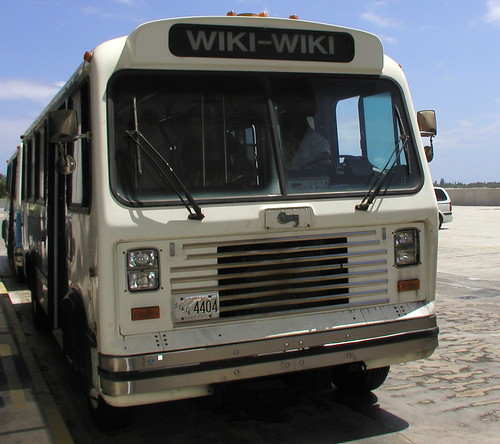 K-12 Wiki Resources
In this posting, I'm going to provide a bunch of resources for using Wikis in education, K-12 primarily. (Thanks to Christopher Sessums for the photo of the original Wiki Wiki--a Hawaiian bus.)
First, if you haven't yet, go take a look at Wikipedia: http://www.wikipedia.org
And then, the more recent Wikia--a collection of wiki-based communities. Have an interest like Star Wars or the Civil War? Start up a wiki on the topic and work together with the world to provide a collaborative resource on the material. Not a lot of K-12 oriented stuff there yet, but you could start up one there.
Then:
Make Way for Wikis
http://www.schoollibraryjournal.com/article/CA6277799.html
Excellent overview of wikis in a K-12 environment. "Teachers and librarians nationwide have begun to explore the role of wikis (pronounced wee-kees or wih-kees) in classroom settings—and the possibilities do appear endless. At Olde Columbine High School in Longmont, CO, Bud Hunt began an experiment last spring using a wiki to teach writing. “The quality of writing across the board was better than any of the work they had done previously,” he says. “I think it was because the students had an authentic audience. They knew others were looking.”
Wiki in a K-12 classroom
http://wik.ed.uiuc.edu/index.php/Wiki_in_a_K-12_classroom
Some specific examples of how you might use Wikis in your teaching.
It's on a wiki itself, so feel free to add some more!
Turning Wikipedia into an Asset for Schools
http://www.andycarvin.com/archives/2005/07/
turning_wikiped.html
Proposes an activity to check the accuracy of Wikipedia.
High School Students (and Teachers) Write Collaboratively on a Wiki
http://www.nycwp.org/paulallison/2005/12/04
A teacher provides a screencast to demonstrate "both how simple it is to begin composing together with students, and how profoundly paradigm-shifting a wiki can be in the writing classroom."
Weblogs & Wikis and Feeds, Oh My!
http://www.nycwp.org/paulallison/
Regular postings on wikis here.
Examples of Educational Wikis
http://educationalwikis.wikispaces.com/Examples+of+educational+wikis
Many, many K-12 wikis linked here, from all around the world!
Holocaust Wiki Project
http://www.ahistoryteacher.com/holocaust/tiki-index.php
This teacher is using a wiki to have his students collaboratively write about the horrific events of the holocaust.
Entire textbooks are being written via Wikis at Wikibooks.
http://en.wikibooks.org/wiki/Main_Page
- Here's an example of a book for K-12 students that is being written collaboratively using a wiki: http://en.wikibooks.org/wiki/Wikijunior_Big_Cats
- Here's an example of a book for K-12 teachers: ttp://en.wikibooks.org/wiki/Blended_Learning_in_K-12
http://www.educause.edu/pub/er/erm04/erm0452.asp
This article focuses on higher ed uses of wikis
Using Wiki in Education
http://scienceofspectroscopy.info/edit/index.php?
title=Using_wiki_in_education
This one also focuses on higher ed, but a lot is applicable to K-12 too.
k12wiki
http://k12wiki.wikispaces.com/
An interesting online conference in which K-12 teachers worked together to create wiki entries on a number of educational topics
Wiki Grading Rubric
http://k12online.wm.edu/WikiGradingRubric.pdf
Very useful!
Even humble Bloomington has its own wiki:
http://www.bloomingpedia.org/wiki/Bloomingpedia
Does your own community? A great idea for a class project!
How to get started? Find a free wiki site. Here's one:
http://pbwiki.com/
If you're an IU student, like those in my Education W505: Using the Internet in the K-12 Classroom course (totally online, open to anyone in the world who is a graduate-level K-12 teacher, librarian, counselor, administrator, homeschooler!), you can use the wiki tool in Oncourse CL.
http://kb.iu.edu/data/atkg.html
Feel free to submit further wiki resources. Especially if you're a K-12 teacher using a wiki in your teaching!
Chris
Tuesday, February 21, 2006
K-12 Blogging Resources (UPDATED 4/2/07)
 K-12 Blogging Resources
I originally made this post last year, but it is substantially updated now. (Thanks to http://www.mikeberta.us/ for the image.)
Writing with Web Logs
A good argument for using blogs in the classroom. If you can only read one of these articles, this would be a good one to read. "The challenge, as it so often is with new uses of technology, is integration. How do educators take advantage of the Web's publishing tools with limited time and resources and in keeping with the standards? Enter a promising new use of technology called Web logs-or blogs, for short. Part Web site, part journal, part free-form writing space, blogs have the potential to enhance writing and literacy skills while offering a uniquely stylized form of expression."
http://www.techlearning.com/db_area/archives/TL/2003/02/blogs.php
Blogging Techniques for the K-12 Classroom
Here's an informative overview of K-12 blogging from the Encyclopedia of Educational Technology. Nice diagrams, too.
http://coe.sdsu.edu/eet/articles/bloggingtech/index.htm
"Some advantages include:
- Providing a centralized place for regular writing practice, thus eliminating the need to collect multiple papers from each student.
- Allowing the teacher and other students to comment and provide feedback on individual posts.
- Creating a greater sense of community within a class that will more deeply permeate into their personal lives.
- Giving a voice to students who may not feel comfortable speaking aloud in a classroom setting or who are overshadowed by the more vocal students."
A good overview of how some Seattle-area elementary teachers are using blogs. "At the end of the year, the third-graders reflected on their experience. "I like blogs because you get to share a creative idea with the world," noted one. "I think I'm a better writer because of my blog," commented another. Added one: "I think that other kids should blog because it's fun and it really helps you learn more and more.""
http://seattletimes.nwsource.com/html/living/2003303937_teachblog14.html
The Future of K-12 Blogging
Here's a manifesto for K-12 blogging. Focuses on computer science, but interesting for everyone, I think. Sidebar has links to a number of K-12 teacher blogs
http://blogs.msdn.com/alfredth/archive/2005/12/31/the_future.aspx
Paul Gates' Second Grade Class Blog
Learn about flowers, from second graders! Neat writings, drawings and photos!
http://lms.saisd.net/cblog/index.php?blog=6
WillowWeb Blogs
Yes, it's those kids from Omaha again! Find out what they are doing by checking out their school's blogs.
http://www.mpsomaha.org/willow/blog/index.html
Check out Mrs. Petta's blog. http://www.mpsomaha.org/willow/blog/pettateacher/
Check out her students' blog: http://www.mpsomaha.org/willow/blog/pettastudents/
Notice any differences?
New Kids on the Blog
http://www.nea.org/neatoday/0510/blogging.html
"Richardson encourages teachers to move beyond online diaries, like the ones at Connors-Emerson, and consider using Web logs as thinking tools. In his old journalism class, no trees were killed—every assignment was paperless. And, in a growing number of classrooms, particularly at the secondary level, many teachers are discovering that a Web log serves as the perfect catalyst for critical debate."
"Plourde believes it's the public and immediate nature of blogging that so motivates her kids. "It's like writing in the clouds," she says. Anybody on Earth can read it, although usually it's just Alexa in the other fifth-grade class or Yuxi's mom."
Schools grapple with policing students' online journals
http://www.csmonitor.com/2006/0202/p01s04-stct.html
"The worries range from the serious - student safety and cyberbullying - to the mundane, minimizing gossip and protecting students from embarrassment. Some schools are trying to restrict access to the sites, or are holding sessions to educate both parents and students on proper guidelines."
Experts to Students: Watch What You Post
http://www.eschoolnews.com/news/showStoryts.cfm?ArticleID=6104
Everyone is always talking about the dangers of predators on the Internet, but the greater danger to many more students may be when future employers or schools look at the things the kids post in their blogs.
A Blogger's Code of Ethics
This is aimed at "professional" bloggers, but could easily be adapted for use with students.
http://www.cyberjournalist.net/news/000215.php
I like this video about blogging in a high school (first one on the page):
http://weblogg-ed.com/videos/
Check out the rest of the weblogg-ed site, too!
Why Weblogs?
Need an academic rationale for the use of blogs with your students? Read this:
http://www.weblogg-ed.com/why-weblogs
Why Teachers Blog?
Check out this graphic! Sort of a concept map about teacher blogging.
http://www.gliffy.com/publish/1142390/
Two examples of graduate student-created blogs:
Kenny Kimchee's EFL Adventures.
One of my students is a middle school EFL teacher in Japan, and he shared his experiences as a teacher over there. Really well-written, insightful stuff!
http://kennykimchee.blogspot.com/
Children's Writing
Another one of my students created this blog to show "examples and thoughts about children's writing at various stages of development." I wish she (and Kenny) had kept their blogs going.
http://kids-create.blogspot.com/
I welcome any other suggestions!
Extra Stuff:
Podcast, Blogs and Wikis Video!
Our workshop on podcasts, blogs and wikis went very well! You are more than welcome to check out the video.
Are You Familiar with LoTi?
It stands for Levels of Technology Integration. It's a kind of rubric for evaluating technology integration in a K-12 classroom. Take a look at it and rank yourself, if you're a K-12 teacher and/or your kids' classroom, if you have kids.
http://itls.saisd.net/loti/htm/LOTIframework.htm
According to this blogger,
http://www.edsupport.cc/mguhlin/blog/archives/2006/02/
entry_1128.htm
the LoTi is "valid & reliable assessment tool with over 60 dissertations attesting to its worth, independently validated by Temple University, "
Cheers,
Chris
Thursday, February 16, 2006
Episode 7: "K-12 Podcasting" is Online!
This episode is just under half an hour. It won't be split up into segments, since it would mess up the flow of the interview. See the "Get the Podcast" link on the right? Click there to go download it.
Note the post below with references to articles about K-12 podcasting. I was going to mention them in the podcast, but I ran out of time. I may mention them next time. Or maybe not!
Tomorrow, we're giving a face-to-face workshop on Podcasting, Blogs and Wikis here in the IU School of Education, from 10-12 noon. You're all welcome to attend!
Thanks to Tony for this interview, and to his students for their contributions! Any comments about this show are also welcome!
Friday, February 10, 2006
Innovative K-12 Project and iPresent-it!
The interview with Tony Vincent went very well. Collaboratively, we figured out how to use Garageband to record iChat audio. Which is a great way to do audio interviews, because GB automatically puts each person on a different audio track, and adds chapter marks when the conversation switches from one person to the other. If you're not using GB to record your podcasts...well, you should!
I'm going to mention this in Episode 7, but you blog readers get the early scoop... Tony Vincent has started a neat project, the Our City project. Students create podcasts about their town. His kids did the first one, Omaha. I dibs Bloomington, IN! Lots of information about how your students can join in the fun at:
http://learninginhand.com/OurCity/index.html
Also, I just found out about a neat new piece of software that puts Powerpoint and Keynote presentations onto your iPod! And the iPod can then be plugged into a TV. This could be a lot easier than lugging a laptop to your presentations! It's called iPresent-it (Mac only, unfortunately).
http://www.zapptek.com/ipresent-it/
Wednesday, February 01, 2006
Episode 7 preview: K-12 Podcasting and Vidcasts: Humbug!
A lot of the articles out there on K-12 podcasting rehash the same basic information, without specifically talking about using the technology with students. Here are the best of the articles that I've found on K-12 podcasting.
NY Times Article (have to register to read this one)
http://www.nytimes.com/2006/01/25/technology/techspecial2/
25podcast.html?_r=1
"It teaches [students] to do research, to communicate in print, to speak effectively and grab attention with sound."
Podcasting craze comes to K-12 Schools (from Education Week)
http://www.nsboro.k12.ma.us/ipod.htm
"Longfellow 7th grader Alyssa M. Gilbertson described the appeal of creating a podcast. “When you're writing an essay,” she said, “you don't try your hardest because after you're done, you throw it away or put it in a box.” But with podcasts, she said, “now we try a lot harder because we want other people to know that we [can] do more. We want people to hear us.”
Exploiting the Educational Uses of Podcasting
http://recap.ltd.uk/articles/podguide.html
"In what ways can the podcasting phenomena be exploited within education? In reality, there are so many possibilities and, ultimately, the creativity and imagination of teachers and learners will drive the educational podcasting agenda in future. However, there are three areas where the potential of podcasting could be realised within schools:
- Devising a cross-curricular activity;
- Providing alternative teaching approaches;
- Promoting and using personalised learning."
http://www.washingtonpost.com/wp-dyn/content/article/2005/10/18/AR2005101801670.html
"Teachers say the benefits of making podcasts are clear: The trendy technology and the possibility of a wider audience motivate students. "My students research better, read more, write better and understand the material," said Beth Sanborn, a fifth-grade teacher at Willowdale Elementary School, near Omaha, where students have been making podcasts since last spring." (***More about Willowdale iin Episode 7!)
Podcasts as Student Projects
http://joycevalenza.edublogs.org/2005/08/31/
podcasts-as-student-products/
"Sprankle notes that the podcasts allow his students to publish to a global community and that motivates them as writers. One a weekly basis, they create successful and purposeful pieces of writing. Sprankile sees his students as “sculptors” of the show and of their learning day. “They ask themselves questions. ‘Is this a podcasting moment? Do I want to share it? Is it meaningful?”"
NEW:
Podcasting: Transforming Middle Schoolers into "Middle Scholars"
http://www.thejournal.com/articles/17607/
From a student: “Podcasting motivates me because you feel like you are telling the world about little stuff that we do. It makes you feel important and accepted.”—Ryan"
"The technology is a tool to implement the curriculum,” Halderson says. “Podcasting is all about learning the content. If you don’t have educational content, you have no podcast; no amount of sound effects, visuals, or music can hide a lack of content in an educational podcast."
VIDCASTING....Humbug!
I don't know about this whole vidcasting, or video podcasting, or whatever, thing though. Right now, I'm listening, yes listening, to the vidcast of Ray and Hollye's The Tech Teachers (http://thetechteachers.blogspot.com/). I started off watching it for the first couple minutes...but it's two people sitting on a couch, for gosh sakes... IMHO, the extra bandwidth and hard drive spaced consumed by the video is wasted. An image of them sitting on the couch attached to the mp3 would be just fine. It's not just them. I watched a recent Mac-related vidcast and it was just two guys standing there talking. To add some visual appeal, they were standing in front of the ocean and occasionally a boat would go by, but geez. There needs to be meaningful video content, folks! Like a product demo...show me the new MacBook Pro, or some new software. But if the program is just people talking, keep it in audio-only podcast format.
Oh, and we should talk about enhanced podcasts too...
Chris
Thursday, January 26, 2006
Episode 6 is online!
- iTunes U! Stanford and Michigan have it! Coming to IU? http://www.apple.com/education/solutions/itunes_u/
profiles/umich.html and http://chronicle.com/free/2006/01/
2006012501t.htm and http://www.idsnews.com/news/story.php?adid=search&id=32004 - Google Scholar -- A great resource for scholarly articles. Now with Chinese and Brazilian academic articles! http://scholar.google.com
- Video-on-demand at IU: Streaming video on content-related subjects for your students! Create your own playlist for your class! http://www.fmgondemand.com
- My experiences with the latest version of Oncourse CL, focusing on the Message Center, and related news about CL. http://oncourse.iu.edu
- iLife '06: Latest version of this multimedia suite, featuring new web development, podcasting and blogging features. http://www.apple.com/ilife/
- An interview with Mike Sassman, our "roving reporter," who visited the MacWorld convention in San Francisco. He tells us about the latest hardware and software and the educational implications. http://www.mikesassman.com
- And, last but not least, a preview of the next episode featuring Shelly and Carson from Willowdale Elementary School in Omaha, NE. http://www.mpsomaha.org/willow/radio/index.html
All 6 episodes available for free at:
http://www.indiana.edu/~icy/podcast/
or search for them in iTunes
or get them at the Educate directory
Sunday, January 08, 2006
Episode Six Preview
Episode Six will be an exciting one! Here are the provisional plans:
Segment 1 will deal with Oncourse CL, the learning management system that we use at IU. It's been substantially improved for Spring 2006. I'll share my experiences setting up my online course in the system. Oncourse CL is part of the Sakai Project, and other schools are using it under other names.
Segment 2 will feature our roving reporter, Mike Sassman. He'll be at the MacWorld Expo in San Francisco, and will let us know about the exciting new technology there (hardware and software), and how it could impact K-12 and higher education. I've heard some exciting rumors, and can't wait to hear his report!
Depending on length, this program may be available in one file, or as two.
Tuesday, December 20, 2005
Episode 5: Now Chunkified!
Episode 5:
Guest: Mike Sassman, Apple Campus Representative and Graduating Senior!
Segment 1: News:
a. Michigan Considers Requiring High-School Students to Take at Least One Online Course
http://chronicle.com/free/2005/12/2005121301t.htm
b. Wired: Apology for Fake Wikipedia Post
The biography he posted, which has since been replaced, falsely stated that Seigenthaler was linked to the Kennedy assassinations and had lived in the Soviet Union from 1971 to 1984.
http://www.wired.com/news/technology/
0,1282,69810,00.html?tw=wn_tophead_6
My Course (in which we talk about Wikis, and many other things):
Education W505: Using the Internet in the K-12 Classroom:
http://www.indiana.edu/~w505a/
c. (Bonus News for our blog readers!) In the Classroom, Web Logs Are the New Bulletin Boards
http://www.nytimes.com/2004/08/19/technology/
circuits/19blog.html?ex=1250568000&en=33627811
ca310596&ei=5090&partner=rssuserland
Segment 2. Special Holiday Topic: Video conferencing with family and friends.
Now that high speed connections are more common, and cams are so cheap, there's no excuse to not be sharing holiday greetings with distant family and friends via videoconferencing.
Music intro by Kelly Mack, Age 2:
http://www.mackacademy.com/ica/blogs/
mackacad.nsf/pages/
christmas2001cd?OpenDocument&Click=
Software: AOL Instant Messenger, Windows Messenger, Yahoo Messenger AOL is cross platform, able to videoconference with Apple's iChat.
Educational use: Video penpals for K-12 students! Our own Virtual Lab School project, which connects college students with real-life K-12 classrooms:
http://www.education.indiana.edu/~vls/
Segment 3. Oncourse CL: What's Ahead
Focus on our course management system/learning management system. Part of the Sakai Project. Challenges during Fall semester, new features and functions for Spring 2006.
Oncourse CL:
http://oncourse.iu.edu/
IU Home Pages article:
"What's ahead for Oncourse CL?"
http://homepages.indiana.edu/2005/12-09/story.php?id=259